Getting started
Install
footman requires Python 3.11+ and has zero runtime dependencies. Installing it
puts two console scripts on your PATH: footman and the two-letter fm.
You can also install it once, globally (uv tool install footman), and
still type plain fm inside uv projects: when a project's uv.lock pins
footman and you aren't already inside its environment, fm hands the
invocation to uv run — the project's own footman runs, at the project's
pinned version, with the project's tools on PATH. One rule, no magic: the
lockfile declaring footman is what makes it fire. Purists opt out with
uv = false under [tool.footman] (or FOOTMAN_NO_UV=1), and TAB
completion is untouched either way — it never enters an environment at
all. uv only for now: its lockfile makes the rule unambiguous. If a
poetry or pdm handoff would serve you, open an issue.
Write a tasks file
Tasks are plain functions. A @task decorator registers one; a group() opens
a nested command group. Put them in a tasks.py at your project root:
from footman import task, group

@task
def lint(fix: bool = False):
    "Run ruff over the project."
    ...

@task
def test(marker: str = "", *pytest_args):
    "Run the test suite (extra pytest args after --)."
    ...

docs = group("docs", help="Documentation")

@docs.task(infinite=True)
def serve(port: int = 8000):
    "Serve the docs locally."
    ...
The docstring's first line is the task's help text — it shows up in
fm --list, fm --help <task>, and your shell's completion menu. Document
parameters there too: an Args: section (Google, NumPy, or Sphinx style —
see typed signatures) puts help on
each option in --help and in completion.
The command name is the function name with underscores turned into hyphens
(add_word → add-word). A module of functions becomes a flat set of commands;
each group() opens a nested command group.
Run tasks
fm lint --fix
fm docs serve --port 8001
fm --list            # every task, flat
fm --tree            # grouped by command group
The signature is the CLI: fix: bool = False becomes a --fix flag,
port: int = 8000 becomes a typed --port option, and a parameter with no
default becomes a required positional. See
Typed signatures for the full mapping.
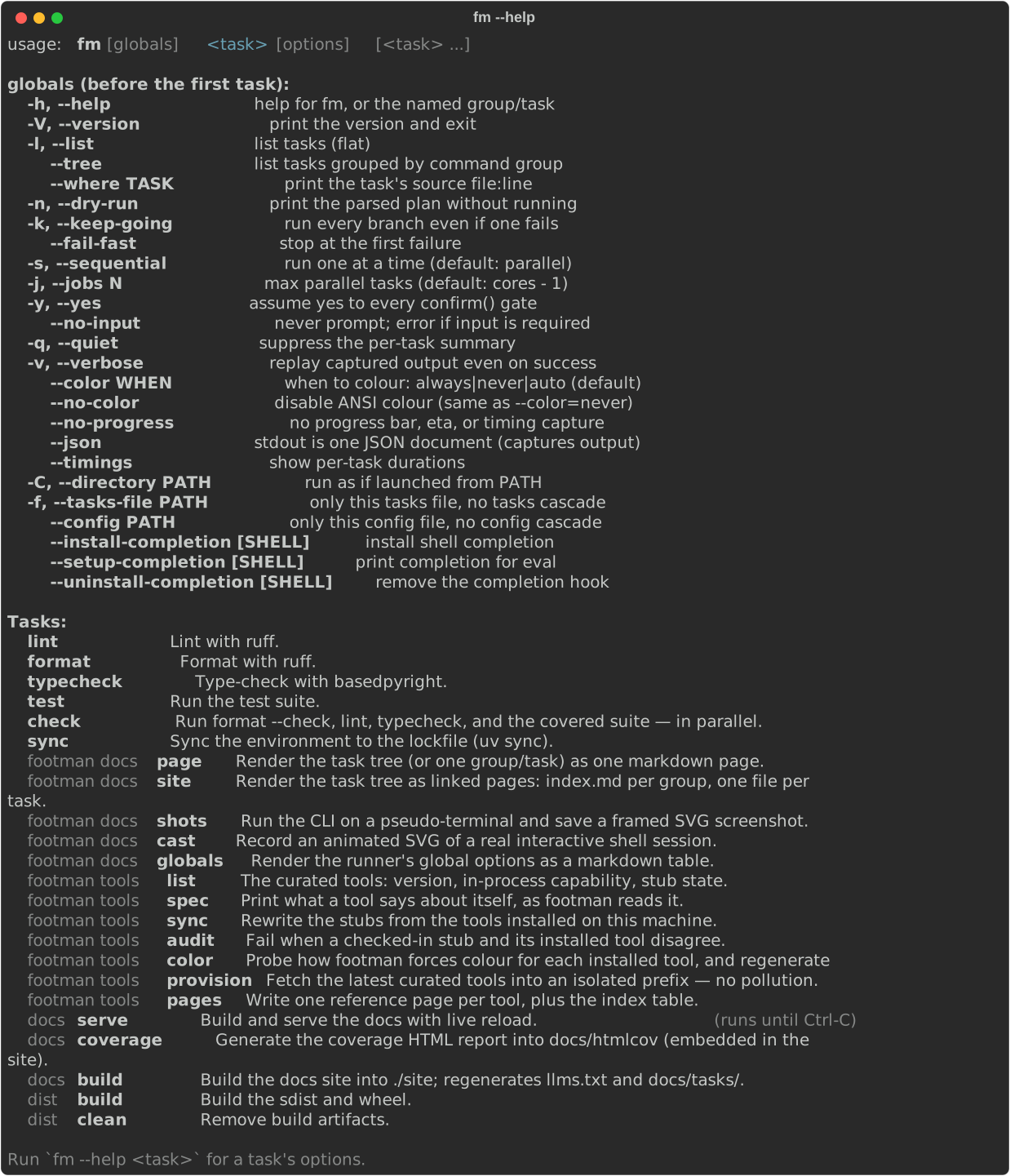
fm --help documents the runner itself — captured here from a real
terminal, regenerated on every docs build:
Chain several tasks
List more than one task on a line and footman runs them as a chain — no separator needed. The manifest (footman's cached description of your task tree — the same file that powers completion) tells the parser every task's exact shape, which is what makes the split deterministic:
Independent tasks in the chain run in parallel by default; -s/--sequential
forces one-at-a-time. See Chaining & parallelism.
Pass arguments through
Everything after -- is handed to the task as passthrough, reachable via a
*args parameter or passthrough():
Dry-run the plan
-n/--dry-run prints exactly what footman parsed without running anything:
Four words you'll meet everywhere
- Manifest — the cached JSON description of your task tree; powers completion and the chain split.
- Cascade — in a monorepo, the merged set of
tasks.pyfiles from the repo root down to your directory. See Monorepos & config. - Chain — several tasks on one command line; independent ones run in parallel. See Chaining & parallelism.
- Context — the per-task object behind
run(); you rarely touch it directly. See Running tools.